
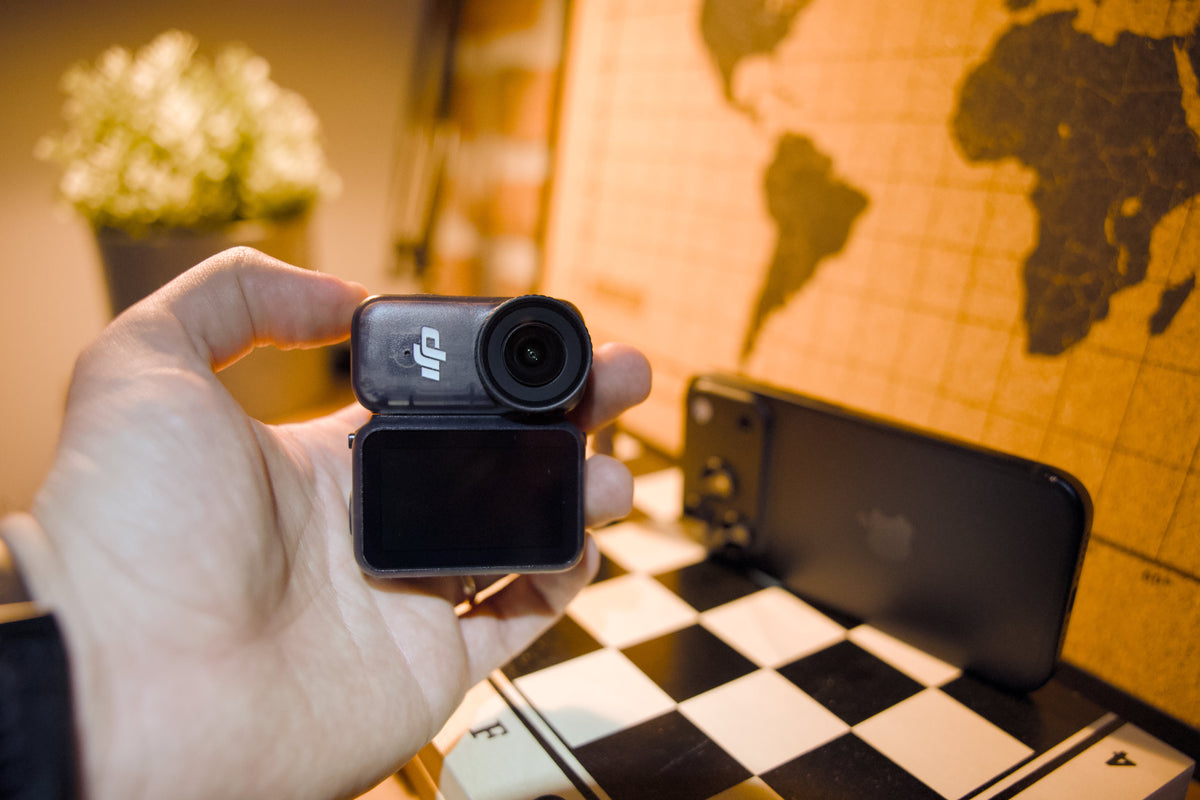
On paper, this shouldn't be close.
The iPhone 18 Pro has three 48MP rear cameras, Apple Log 2, ProRes RAW, and a price that starts at $1,199. The DJI Osmo Nano has one fixed-focus lens, weighs 52 grams, and DJI's own store lists it at $299.
So I took both to Skånes Djurpark in southern Sweden for a family day out and vlogged with them side by side. By lunch I was already close to calling a winner. And the reason had almost nothing to do with image quality.
Nobody sponsored this. I bought the Osmo Nano with my own money, and neither DJI nor Apple has seen this post before you.
This post is the reference half of the story: the official numbers from DJI and Apple, what those numbers actually mean when a camera is hanging on your chest, and a few things I said on camera that the documentation corrects. The footage, the lunch-break verdict, and the exact moment I gave up on the iPhone neck mount are in the video.
The short answer
- Going out with the intention to vlog or shoot POV? The Osmo Nano.
- Capturing family moments with whatever is already in your pocket? The iPhone 18 Pro, handheld.
That's the verdict. The interesting part is why, and the one line on Apple's spec sheet that could flip it in round two. More on that further down.
The official specs, side by side
Every number below comes from DJI's and Apple's own websites. The last column is the part a spec sheet never tells you.
| Spec | DJI Osmo Nano | iPhone 18 Pro | What it means when you vlog |
|---|---|---|---|
| Price (official store) | $299 (64GB Standard Combo) | From $1,199 (256GB) | Roughly four Nanos for one iPhone |
| Weight | 52 g camera, 72 g Vision Dock | 211 g | Weight is what you feel on a neck mount by hour three |
| Size | 57.3 × 29.5 × 28 mm | 150.0 × 71.9 × 8.75 mm | One disappears under a shirt, one doesn't |
| Widest field of view | 143° | 120° (Ultra Wide, 13 mm) | The Nano sees more, even against the iPhone's .5x lens |
| Selfie camera | The same camera, flipped on the magnetic dock | 18MP front camera, ƒ/1.9, autofocus | On the Nano, you never trade down to a "worse" lens to see yourself |
| Max video | 4K/60fps (16:9), 4K/50fps (4:3) | 4K/120fps Dolby Vision (main), 4K/60fps (front) | The iPhone wins on raw frame rates |
| Log profile | 10-bit D-Log M | Apple Log 2 (rear and front cameras) | Both give you a flat file to grade |
| Recording format | MP4 (HEVC), up to 120 Mbps | HEVC, H.264, ProRes, ProRes RAW | ProRes at 4K/120 needs external recording on the iPhone |
| Stabilization | RockSteady 3.0, HorizonBalancing (±30°) | Sensor-shift OIS, Cinematic video stabilization, Action mode up to 2.8K/60 | Both handled walking footage well in my test |
| Built-in mics | 2 | 4, with wind noise reduction | More mics on paper for the iPhone |
| Wireless mics | Direct connection to DJI mics, up to two, no receiver | Through the USB-C port, with a receiver | The Nano needs one less piece of kit |
| Storage | 64GB or 128GB internal | 256GB to 2TB | The Nano's microSD slot lives in the dock (see below) |
| Official battery figure | 90 min camera, 200 min with dock | Up to 36 hours video playback | Neither number describes vlogging (see below) |
| Water resistance | Camera alone to 10 m, IPX4 with dock | IP68, 6 m for up to 30 minutes | The Nano goes deeper, and you won't cry if it gets lost |
Four numbers that decided it
143° vs 120°: the .5x problem
This is the one that surprised me most when I checked Apple's documentation after filming.
In the video I said that to match the Nano's field of view on the iPhone, you have to switch to the .5x lens. That's the right instinct, but Apple's own numbers show it doesn't quite get there: the iPhone 18 Pro's Ultra Wide tops out at 120°, while DJI rates the Nano at 143°. The Nano still sees 23 degrees more.
And that's before the bigger issue. To vlog with the iPhone's best cameras, you have to point the back of the phone at yourself, which means you can't see your framing. My first clip at the park entrance was shot exactly like that, on the main lens, and it was so close to my face it was almost unusable. I left it in the video so you can judge for yourself.
The workaround is the 18MP front camera, which is what I used for most of the iPhone footage. It's a very good camera. But it's not the one Apple puts on the poster.
52 g vs 211 g: why the neck mount lost before the footage did
The iPhone is roughly four times heavier than the Nano's camera module, and on a body mount you feel every gram.
I bought a phone neck mount to test this before I even owned the Nano. If you've read my first look at the Osmo Nano and why phone mounts never worked for me, you already know how I feel about it. In the video, I hold both setups up side by side. The difference is hard to explain in text and very obvious on screen.
The Nano clips to a magnetic plate hidden under your shirt. Nobody at the park noticed it. Everybody noticed the phone.
90 / 200 minutes vs "no recording figure at all"
DJI rates the Nano camera at 90 minutes on its own and 200 minutes with the Vision Dock. The fine print matters: those figures were measured recording 1080p/24fps with the screen off and Wi-Fi disabled. For 4K/60, DJI quotes "over 50 minutes" of continuous recording in Endurance mode.
Apple doesn't publish a video recording time for the iPhone 18 Pro at all. The 36-hour figure on the spec page is for video playback, which tells you nothing about how long it lasts filming 4K.
So on paper, the iPhone has the bigger battery, and in the video I give it the win for longer runtime. But the Nano has a trick the phone can't copy: the dock charges the camera first, and DJI confirms the camera can be used while charging. That's how I recorded a full 24-hour day-in-the-life video on paternity leave with the Nano. I explained the charging logic in more detail in my post on taking the Osmo Nano through Sweden, Spain, and Brazil.
$299 vs $1,199: the fair version of the price argument
Price is the easy headline, but it's only half fair. The iPhone isn't just a camera. It's your phone, your email, your maps, your everything tool. You already own it, and it's already in your hand when something happens.
The fair question isn't "which one is cheaper." It's: do you need a second device to vlog? If you go out specifically to film, the Nano costs a quarter of the iPhone's starting price and was the more pleasant tool to use all day. If you don't, the best camera is the one you're already carrying.
See the test
Things to watch for (timestamps approximate):
- Around 2:00: the iPhone neck mount reveal, and why I took it off
- Around 2:50: the mounts that come in the Nano's box, shown at lunch
- Around 10:15: why vlogging with the iPhone's back camera fell apart
- Around 12:05: the MagSafe card reader workaround for heavy log files
- Around 13:30: the dock trick behind 24 hours of recording
- Around 15:00: my final verdict on phone neck mounts (I don't hold back)
A few things I said on camera, clarified
I fact-checked the video against DJI's and Apple's documentation after editing. Most of it holds up. These four are worth clarifying:
The Nano doesn't record to the microSD card. In the video I mentioned the Nano has internal storage and a microSD slot. Both are true, but the slot is in the Vision Dock, and DJI's FAQ confirms you can't record directly to the card. Footage goes to the internal storage (48GB usable on the 64GB model, 107.6GB on the 128GB model), and the microSD card is for offloading to free up space.
The iPhone's stabilization isn't "Apple Intelligence." I wasn't sure of the name on camera. Apple's spec sheet credits sensor-shift optical image stabilization, Cinematic video stabilization, and Action mode (up to 2.8K at 60fps). The front camera has what Apple calls Ultra-stabilized video. Apple Intelligence is a separate feature set.
The sensor size comparison can't be settled from official specs. I guessed the Nano's sensor might be a little bigger than the iPhone's. DJI publishes its sensor size (1/1.3-inch). Apple doesn't publish sensor sizes on the iPhone 18 Pro spec page, so there's no official number to compare. What we can compare: the Nano has a fixed f/2.8 aperture, while the iPhone's main camera has a variable aperture from ƒ/1.48 to ƒ/4.0.
The DJI Mic 1 really doesn't pair. This one I got right, and it's worth confirming: DJI's FAQ states the Nano only supports DJI microphones and that direct connection to the first-generation DJI Mic isn't supported. If you own a Mic 2, Mic 3, or Mic Mini, you can skip the receiver entirely. If you own a Mic 1 like me, you can't.
The plot twist for round two: the iPhone's front camera shoots Apple Log 2
Here's the line on Apple's spec sheet I keep coming back to.
In this test, the Nano was shooting D-Log M and the iPhone was on standard settings. That's not a level playing field for color, and I said so in the video.
But Apple lists Apple Log 2 on the front camera, along with ProRes recording up to 4K/60fps with external recording. The front camera is exactly the one I vlogged with. Which means a log-vs-log rematch is possible, with the iPhone using the camera that actually works for selfie vlogging.
The catch is file size, which is where the MagSafe card reader from the video comes in. Whether that setup is practical for a full day of walking around is something I genuinely don't know yet.
That's the next video. If you want to see whether the verdict changes, subscribe to the channel.
Which one should you choose for vlogging?
| If you... | Choose |
|---|---|
| Go out specifically to vlog or shoot POV | Osmo Nano |
| Want hands-free footage nobody notices | Osmo Nano |
| Already own a DJI Mic 2, Mic 3, or Mic Mini | Osmo Nano |
| Want to film underwater (beyond 6 m) | Osmo Nano |
| Want the best image possible from one device, handheld | iPhone 18 Pro |
| Need high frame rates (4K/120) or ProRes | iPhone 18 Pro |
| Mostly capture spontaneous family moments | iPhone 18 Pro |
| Don't want to carry a second device | iPhone 18 Pro |
For me, it's both. The Nano comes with me when I go out with the intention to shoot. The iPhone covers the moments when I'm just out with my family and the phone is already in my hand. No neck mount for the phone, ever again.
If you're going with the Nano, start with the D-Log M, sharpness, and noise reduction settings I use. The defaults work against you.
FAQ
Is the DJI Osmo Nano better than the iPhone 18 Pro for vlogging?
For intentional vlogging and POV, yes, in my experience: it's lighter (52 g vs 211 g), wider (143° vs 120°), mounts magnetically, and costs a fraction of the price. For pure image quality from a single handheld device, the iPhone 18 Pro has more lenses, higher frame rates, and ProRes.
Can the iPhone 18 Pro shoot log video on the front camera?
Yes. Apple lists Apple Log 2 for the 18MP front camera, plus ProRes up to 4K/60fps with external recording.
Does the DJI Osmo Nano record directly to a microSD card?
No. According to DJI, footage is recorded to the camera's internal storage. The microSD slot in the Vision Dock (up to 1TB) is used to offload footage.
Which microphones work with the DJI Osmo Nano?
DJI microphones only, connected directly without a receiver, up to two at once. DJI states the first-generation DJI Mic is not supported.
How long does the DJI Osmo Nano battery last?
DJI rates it at 90 minutes for the camera alone and 200 minutes with the Vision Dock, measured at 1080p/24fps with the screen off. At 4K/60fps, DJI quotes over 50 minutes of continuous recording in Endurance mode. Real-world use will vary.
Is the DJI Osmo Nano waterproof?
The camera on its own is waterproof to 10 meters. With the Vision Dock attached, the system is rated IPX4 (splash resistant). The iPhone 18 Pro is rated IP68, to 6 meters for up to 30 minutes.
Specs and prices sourced from DJI Osmo Nano specs, DJI Osmo Nano FAQ, the DJI Store, Apple iPhone 18 Pro tech specs, and the Apple Store. Prices are US list prices and vary by region.
Which would you take out to vlog: the phone already in your pocket, or the 52-gram camera clipped to your shirt? And if you've already shot Apple Log 2 on the iPhone's front camera, tell me how it went before I test it. Drop it in the comments.
Share:
Is the iPhone 18 Pro Camera Good Enough to Replace a Full-Frame Camera?