Every September the same question comes back. New iPhone, new camera system, and someone asks if this is the year you can sell the mirrorless.
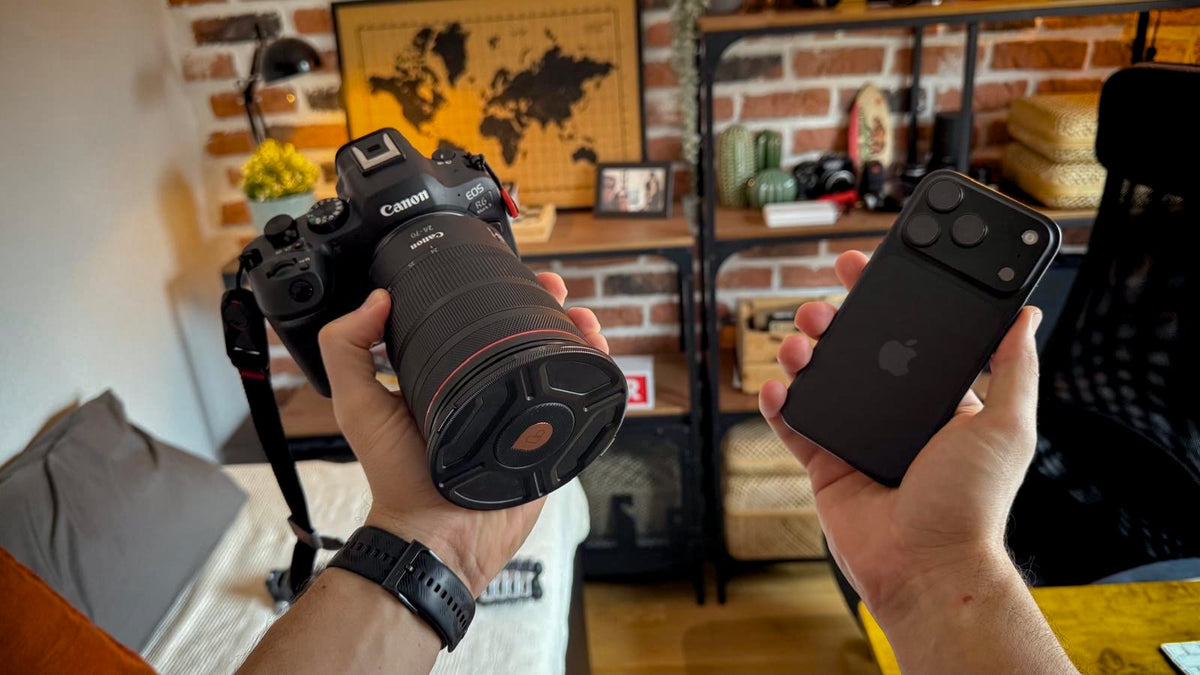
I just bought the iPhone 18 Pro with my own money, and I shoot client work on a Canon R6 Mark II with the RF 24-70mm f/2.8. So I've got both in my bag right now, and I keep asking myself which one I actually need to carry.
The honest answer isn't "the camera always wins." It also isn't "phones are good enough now." It depends on what the phone is doing behind the scenes, and what it physically can't do. Let's break that down.
What the iPhone does that a camera doesn't
A camera like the R6 Mark II takes one exposure. You pick the settings, it records the light, and the JPEG is its interpretation of that single moment.
The iPhone doesn't really take a photo in that sense. It captures a burst of frames, and Apple's pipeline (Photonic Engine, Deep Fusion and Smart HDR 5) merges them, processing the sky, the faces and the shadows differently before you ever see the result.
That's why a phone photo looks finished straight away. Bright sky with detail, face with light on it, shadows lifted. No editing, no thinking about exposure.
On a camera, you'd get the same result by shooting RAW and pulling the highlights and shadows back in Lightroom. Same destination. The phone just does the trip for you, every single time, whether you want it to or not.
And that last part matters. The processing that rescues a tricky scene is the same processing that adds digital sharpening and that slightly "too clean" look. You don't get one without the other.
What a bigger sensor still buys you
Here's where physics comes in. Apple doesn't publish the sensor size of the iPhone 18 Pro main camera, but it's a fraction of the 35.9 x 23.9 mm full-frame sensor in the R6 Mark II.
| Spec | iPhone 18 Pro | Canon R6 Mark II + RF 24-70mm f/2.8L |
|---|---|---|
| Main sensor | 48MP Fusion Main (size not published) | 24.2MP full-frame, 35.9 x 23.9 mm |
| Focal range | 13 mm to 200 mm across three cameras | Interchangeable, but for this one lens, 24 to 70 |
| Aperture | f/1.48, f/1.8, f/2.8, f/4.0 (main camera) | Constant f/2.8 |
| Stabilization | Sensor-shift OIS | Up to 8 stops in-body, plus 5 stops in the lens |
| Pro formats | ProRAW, Apple Log 2, ProRes RAW | 14-bit RAW, Canon Log 3 (10-bit 4:2:2) |
| Weight | 211 g | About 1,570 g (670 g body with card and battery, 900 g lens) |
Two things in that table surprised me.
The phone covers more focal range. 13 mm ultra wide to an optical-quality 200 mm, all in your pocket. My 24-70mm can't do either end. If reach and flexibility are what you need, the phone is ahead, right?
The f-number doesn't mean what you think. f/1.48 looks brighter than f/2.8 on paper, and per area of sensor it is. But background blur depends on sensor size too. At the same framing, the full-frame camera at f/2.8 gives you a shallower, more natural falloff than the phone wide open. That's why the iPhone leans on Portrait and Cinematic modes to fake it, and why the edges of hair still give it away.
The bigger sensor also means more real detail per pixel, so the camera doesn't need to sharpen as hard to look crisp. That's the "organic" look people talk about with full-frame footage. It's not magic. It's just less processing covering for less light.
I shot the same scenes at a pumpkin farm in Sweden with both, labelled them Camera A and Camera B, and didn't say which was which until the end. Make your guess before the reveal. I'll be honest: it's closer than I expected in some shots.
Which one I'd actually grab
This is the part that matters more than any spec sheet. Here's how I'm splitting it now that I have both:
| Situation | I'd grab | Why |
|---|---|---|
| Family day out, weekend trip | iPhone | Finished photos with zero effort, and nothing to carry |
| Bright sky with people in front, no time to edit | iPhone | Multi-frame HDR handles it out of the box |
| Client photo shoot | Canon | RAW files, consistent colour across hundreds of images, real depth of field |
| Client video or interviews | Canon | Canon Log 3, better audio inputs, and a monitor when focus matters |
| Social clips, behind the scenes | iPhone | Shoot, edit, post from the same device |
| Low light, people moving | Canon | Bigger sensor, less noise, no smeared detail from processing |
| Anything that gets cropped hard or printed big | Canon | Real detail holds up, processed detail doesn't |
The pattern: the iPhone wins when the result needs to be good now. The Canon wins when the result needs to be good later, after editing, cropping, colour grading or printing.
On the client side, the camera is only half the setup anyway. For video I'm also running a field monitor with false color and focus peaking, and that's not something a phone replaces.
Settings that close the gap (in both directions)
If you want to use both together, you'll want them to look closer to each other. Here's where I'd start:
| Goal | Setting |
|---|---|
| Less processed iPhone photos | Turn on ProRAW in Settings > Camera > Formats and edit like a camera RAW |
| Less processed iPhone video | Shoot Apple Log 2 and grade it alongside your camera footage |
| Softer, less contrasty iPhone look | Lower the Tone in Photographic Styles |
| Canon JPEGs that hold the sky | Turn on Highlight Tone Priority |
| Canon JPEGs with lifted shadows, closer to a phone | Turn on Auto Lighting Optimizer |
| Less "camera" sharpness to match a phone | Adjust sharpness in your Picture Style, or set it per clip in the edit |
None of this turns one device into the other. But it makes them easier to cut together, which is really the point if the phone is your second angle.
I ran into the same matching problem with a tiny action camera, where the default sharpening was the giveaway every time. The fix was similar, and I shared the exact settings I use to match the DJI Osmo Nano with my R6 Mark II.
So, can it replace a full-frame camera?
For most people, most of the time? Pretty much yes. If you'd never edit a RAW file anyway, the iPhone 18 Pro does that work for you, and at 211 grams it's always there. Same logic I found when a 52-gram camera ended up coming with me across three countries: the camera you carry beats the one at home.
For client work, no. Not because the phone is bad, but because I need files I control, not files that were already decided for me.
Would you trust an iPhone for a paid shoot? And did you guess Camera A or B right in the video? Drop it in the comments of my YouTube video.
Share:
Why I Picked a Mac mini Over a NAS (And the One Gap I Still Have to Close)
iPhone 18 Pro vs DJI Osmo Nano for Vlogging: I Shot a Full Day With Both, and the Spec Sheet Didn't Predict the Winner